Lease Renewals
In short: To renew a tenant at the same unit, send the renewal lease for e-signature from their profile, then extend their lease end date once it's signed. If they're moving to a different unit, create a new profile for the new lease.
Renewing at the same unit
Step 1: Send the renewal lease for e-signature (optional)
Skip this step if you're handling the lease outside the app.
Open the tenant's profile.
Click Edit Resident, then Send E-Sign Document.
Attach your lease template and click Save.
PandaDoc opens. Fill in the fields on your lease template and send it.
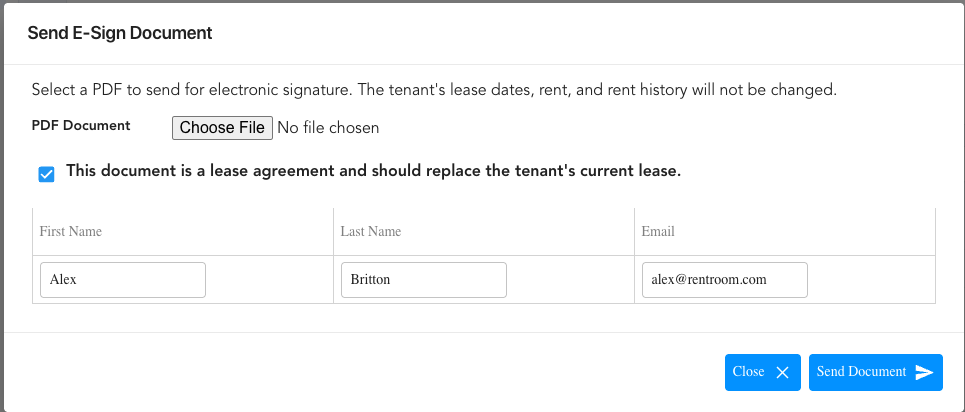
Check signing status: scroll down on the tenant's profile to the Notes & Docs section.
Step 2: Extend the lease
Once the renewal lease is signed, update the lease end date in either of these ways:
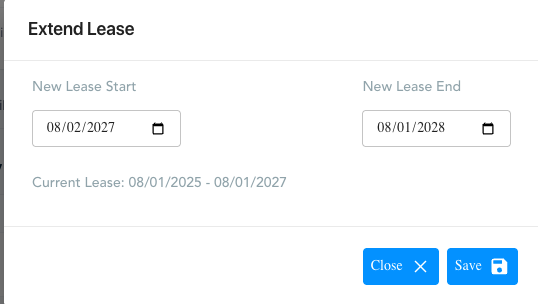
Click Edit Resident, then Extend Lease, or
Click Edit Resident, then Edit Information, and change the Lease End date.
Click Save.
Still stuck? Contact support.