Sending Community Posts & Push Notifications
In short: Use Community to send announcements to tenants as a push notification on their phone. Each post also appears in the Posts section of the tenant mobile app. It’s useful for building updates, closures, events and reminders.
Create a post
Click Community in the left menu.
Click Add Post in the top right.
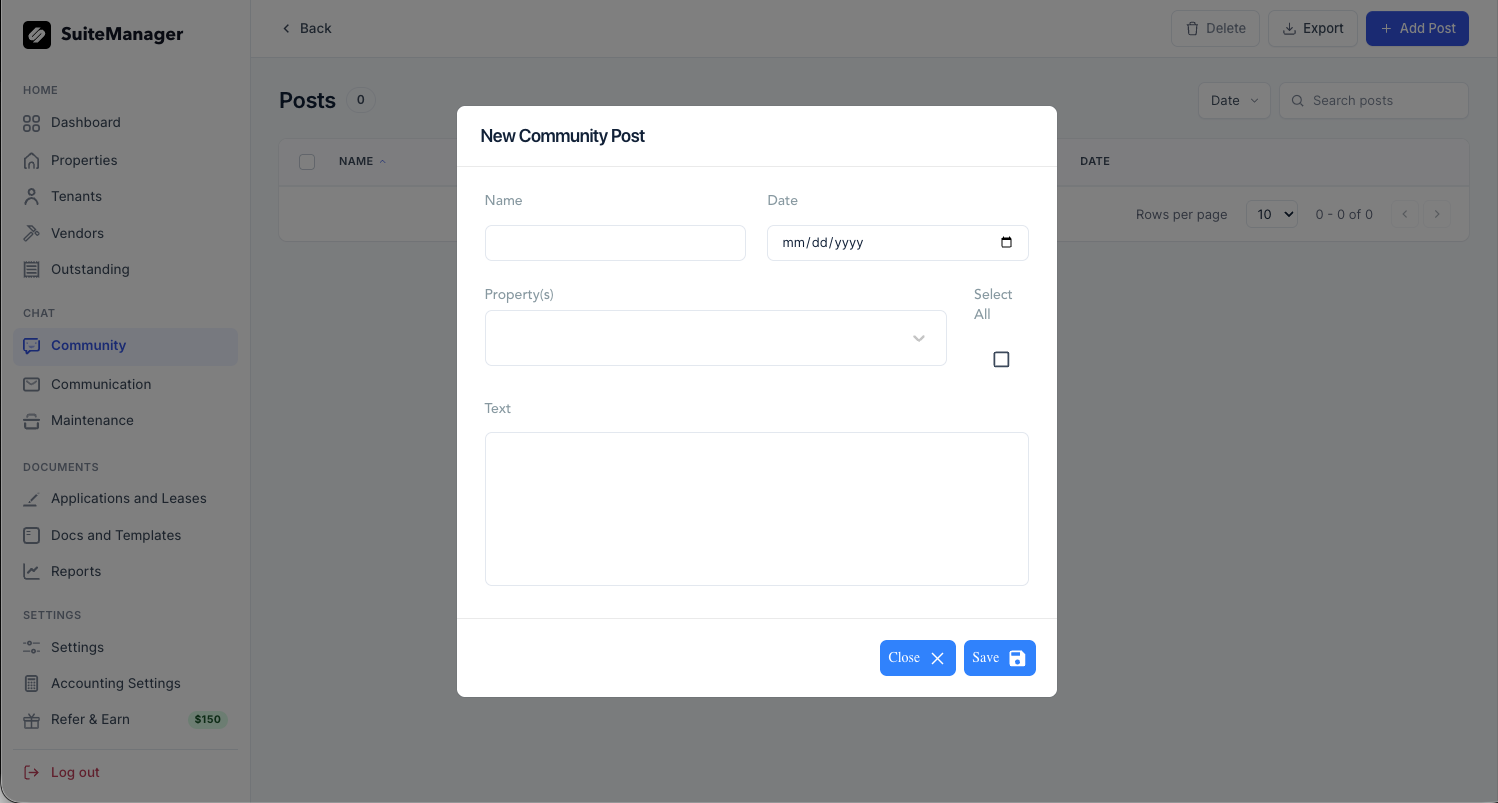
Fill in your post:
Name: the title of your post, like “Water Shut-Off Friday.”
Date: the date of the post.
Property(s): choose which properties receive it. Check Select All to send to every property.
Text: your announcement.
Click Save.
Tenants at the properties you chose get a push notification, and the post shows up in Posts in their app.
Manage your posts
All your posts are listed on the Community page. From there you can:
Search posts or filter by Date.
Export your posts.
Delete a post. Check the box next to it, then click Delete.
Community vs. Communication
Community: one-way announcements to everyone at a property, sent as a push notification and saved in the app’s Posts section.
Communication: one-on-one or bulk texts and emails, plus replies from tenants.
Good to know
Push notifications only reach tenants who use the mobile app and have notifications turned on. For something urgent, like a water shut-off, consider also sending a text from Communication.
Still stuck? Contact support.